
Many users host their project plans in the cloud using Project Server Subscription Edition, or other versions of Project Server. OnePager is able to access these Project Server-hosted plans to create new charts and to update existing chart with new information.
If you are having difficulty updating your OnePager reports using the standalone version of OnePager that runs outside of Microsoft Project, it may be because OnePager is having difficulty connecting to Project Server on its own. There are a few ways to resolve this:
Upgrade to a Later Version of OnePager
Several known Microsoft issues prevented earlier versions of OnePager from connecting directly to Project Server. Microsoft has since fixed their issues, and these fixes have been incorporated into later versions of OnePager. If you are using Project Server and want to create or update reports from OUTSIDE Microsoft Project on the desktop, please ensure that you are running the following:
- If you are connecting via TLS 1.2 and multi-factor authentication (MFA) over CSOM, you need OnePager v7.2.15 or later running .NET Framework 4.5 or higher.
- If you are connecting via TLS 1.2 and multi-factor authentication (MFA) over OData, you need OnePager v7.2.15 or later running .NET Framework 4.5 or higher.
- If you are connecting via TLS 1.2 and modern authentication over CSOM, you need OnePager v7.1.7 or later running .NET Framework 4.5 or higher.
- If you are connecting via TLS 1.2 and modern authentication over OData, you need OnePager v7.1.8 or later running .NET Framework 4.5 or higher.
- If you are connecting via TLS 1.2 and legacy authentication, you need OnePager v6.1.7 or later running .NET Framework 4.5 or higher. Note: For security reasons, Microsoft is sunsetting Project Server support for legacy authentication, so it is a good idea to upgrade to a version of OnePager that supports modern authentication now.
- If you are connecting via TLS 1.0, you need OnePager v5.3.11 or later running .NET Framework 4.0 or higher. Note: For security reasons, Microsoft no longer supports TLS 1.0 for many on-premise versions of Project Server 2016, 2019, and Project Server Subscription Edition, so it is a good idea to upgrade to a version of OnePager that supports TLS 1.2 now.
If your maintenance and support is current, you can use our replacement download tool to upgrade to the version of OnePager that you need.
Switch from CSOM to OData to Prevent Throttling
When connecting directly to Project Server 2013-2019 or Project Server Subscription Edition, OnePager v7.1.8 and later gives you the choice to either use Microsoft's legacy CSOM technology or their newer OData interface. While both methods usually work interchangeably, OData tends to be a bit faster than CSOM, so if you are importing large amounts of data or have a large amount of data in your server environment, you may find that your CSOM connection is being throttled by Microsoft. You can avoid this by switching your connection from CSOM to OData. Note that Project Server Subscription Edition does not support OData.
Update Using the OnePager Add-In for Microsoft Project
If you don't have permission to upgrade your OnePager software, you can still connect to Project Server Subscription Edition, Project Server 2019, Project Server 2016, or Project Server Subscription Edition from INSIDE Microsoft Project on the desktop. Here's how:
- Close the instance of OnePager that is running outside of Microsoft Project.
- Launch Microsoft Project on your desktop and open your project plan from Project Server 2016-2019/Project Server Subscription Edition.
- Once your project plan loads from Project Server, go to Add-ins and click the OnePager button.
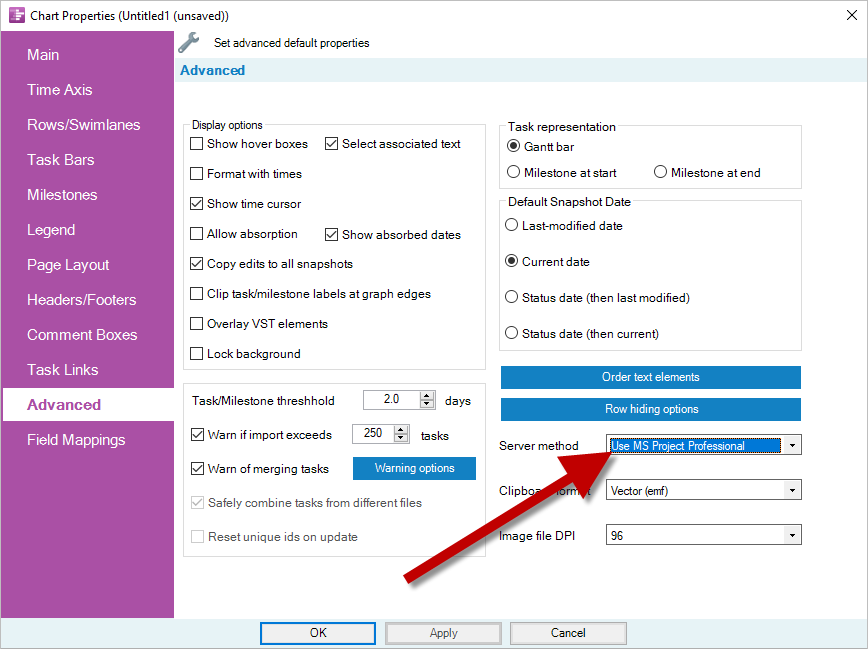
- OPEN (don't update yet) your chart, and go to Home > Chart Properties > Advanced.
- Change the Server Method setting to "Use MS Project Professional". This tells OnePager to let Project load your data from Project Server. Click OK.
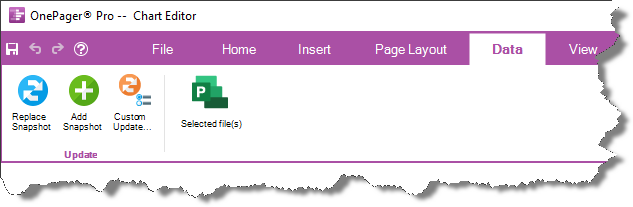
- Go to the Data tab and continue updating your chart as you normally would:
Applies To
OnePager Bundle, all versions
OnePager Pro, all versions
Last Updated: August 24, 2026